Short Version
SSH to old host
SCP VM config file to new host scp /etc/pve/qemu-server/<VM ID>.conf <new host>:/etc/pve/qemu-server/
Delete the confg file (NOT THE VM) on the old host
Setup
This post assumes you already have shared storage connected to both hosts. The hosts do not need to be clustered.
The host with the VMs needs to have SCP access to the new host.
It's a good idea to run a backup on all VMs including ones that are usually excluded before doing anything.
Here's the setup for the examples in this post
NASDatastore - NFS fileshare
pve (10.0.0.18) - Old PVE host. All VMs that need to be moved are running on this host.
pve-bee (10.0.0.17) - New PVE host. VMs need to be moved to this host.
VM 108 - VM being moved in the example.
Moving VMs
Shut down the VM you want to move before starting. Check that all VM disks are stored in the shared storage.
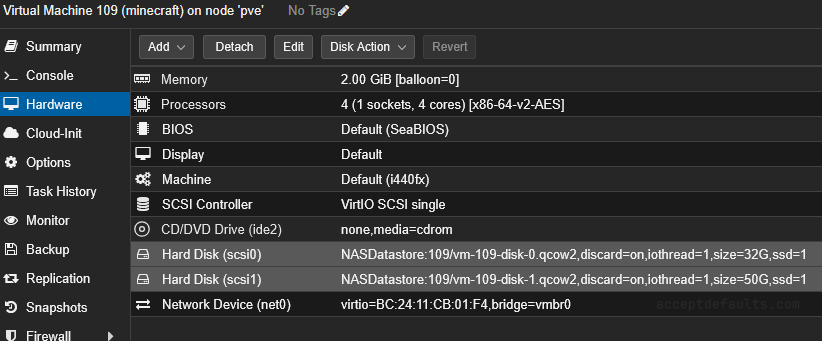
SSH to the old host and cd to the VM configs folder. Default is /etc/pve/qemu-server
cd /etc/pve/qemu-server
Copy the VM config file (<VM ID>.conf) to the new host with
scp /etc/pve/qemu-server/<VM ID>.conf <new host>:/etc/pve/qemu-server/
SCP will prompt for a password and may ask to trust the host if you haven't SSH'd to the new host before.
scp /etc/pve/qemu-server/<VM ID>.conf <new host>:/etc/pve/qemu-server/

The VM will now exist on both hosts.
Compare the configs (most importantly the disk location and disk type) on both VMs.
Power on the VM on one host. Do not power on the VM on both hosts.
Delete the VM config file from the old host. Do not delete the VM in the UI or the disks will be deleted.
rm /etc/pve/qemu-server/<VM ID>.conf
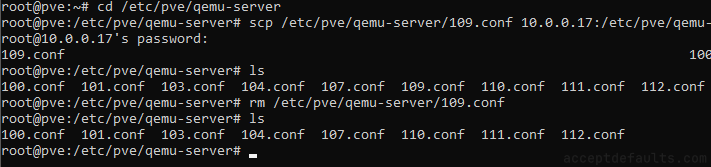
Move the VM back to non-shared storage if needed.
Notes
Remember to setup backups on the new host. The VM config will not carry over backup settings.
You may need to rescan qm rescan if the VM is not added/removed after the copy/delete
qm rescan